Urban AirCare Demo: A Real Booking and Deposit System for Local Service Businesses
By admin · February 22, 2026
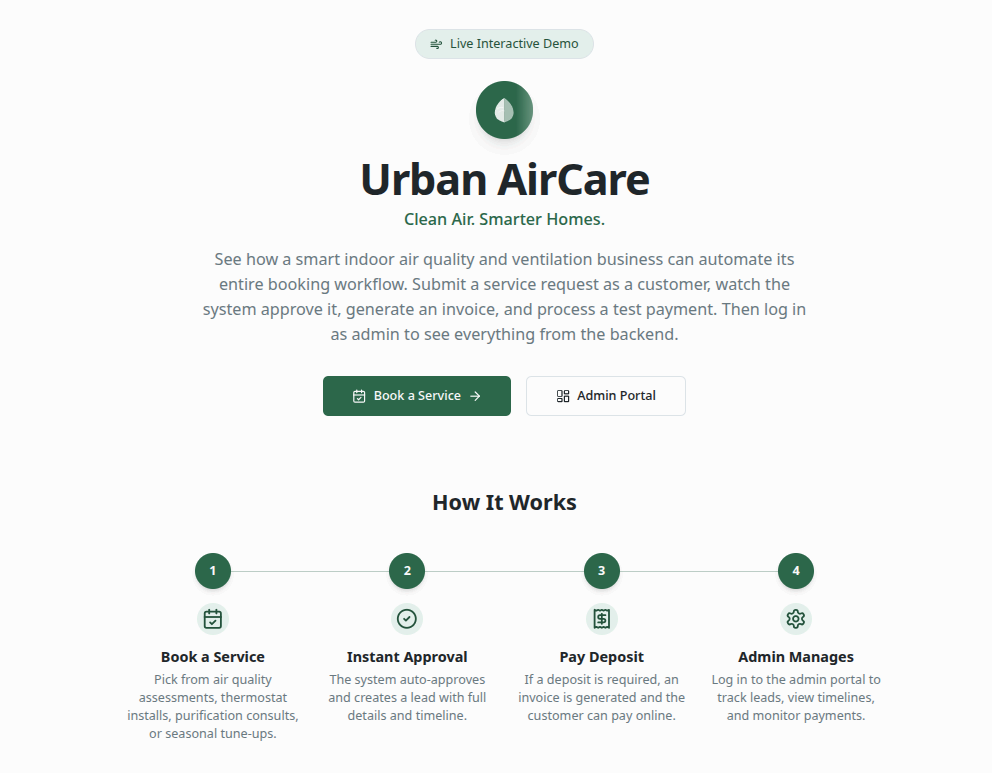
Inside the Urban AirCare Booking and Admin System
At Hustle Labs, we built the Urban AirCare demo to show what structured service operations look like when booking logic, deposit enforcement, approvals, and reporting are designed intentionally.
Not as a concept.
Not as a mockup.
As a functioning operational model.
Most service businesses do not lack demand.
They lack visibility.
A request comes in.
Someone replies.
Availability gets checked.
An invoice gets sent.
A deposit may or may not get paid.
And somewhere in the middle, information disappears.
Urban AirCare is fictional. The infrastructure behind it is not.
The live interactive demo at:
urban-aircare-demo.hustlelabs.devexists to demonstrate how a local service workflow can operate when systems are built with clarity from the start.
Before we go further, an important clarification:
- The demo auto-approves bookings after 10 seconds so you can experience the full lifecycle quickly.
- Emails and payment confirmations are simulated for demonstration.
- No real customer data is collected.
- Approval timing, deposit rules, and notification behavior are configurable in a real deployment.
The demo is intentionally compressed. The structure is real.
The Front End: Services With Rules Attached
The booking page does not present vague options.
It defines real services with clear constraints.
Each offering includes:
- Description
- Price
- Duration
- Deposit requirement
For example:
Indoor Air Quality Assessment
$149 · 60 minutes · $50 deposit required
Smart Thermostat Installation
$249+ · 90 minutes · $50 deposit required
Whole-Home Air Purification Consultation
Free · 45 minutes · No deposit required
Seasonal HVAC Optimization Tune-Up
$179 · 75 minutes · $50 deposit required
That structure allows the system to enforce logic automatically.
Deposit-required services trigger invoice generation.
Free consultations bypass deposit logic.
The rules are defined before submission. That is what makes automation reliable.
What Happens After Submission
In the demo:
- The request is recorded.
- Confirmation appears immediately.
- An event is logged.
- Ten seconds later, the appointment is auto-approved.
- If required, a $50 invoice is generated.
- The deposit workflow begins.
When the test deposit is completed:
- Deposit status updates.
- The event timeline reflects the payment.
- Dashboard metrics adjust accordingly.
This sequence is accelerated for demonstration.
In a real deployment, the workflow would typically look like this:
- Inquiry submitted
- Admin notified
- Approval or denial within a defined window (for example, 24 to 48 hours)
- Conditional deposit invoice triggered upon approval
- Status updated and confirmation sent
Auto-approval can be enabled. It can also be disabled entirely.
Approval windows, reminder intervals, escalation rules, and deposit requirements are configurable.
The demo compresses that timeline into seconds so you can see the system working end-to-end.
The Admin Portal: Operational Visibility
Log into the Admin Portal.
Now you see what most service businesses never see clearly.
Top-level analytics include:
- New Assessments This Week
- Installations Scheduled
- Deposit Collection Rate
- Estimated Revenue
- Total Leads
- Average Response Time
- Conversion Rate
Deposit Collection Rate reveals whether deposit enforcement is working.
Average Response Time exposes operational speed.
Conversion Rate shows how inquiries progress through your pipeline.
Estimated Revenue updates as leads move between statuses.
These are workflow metrics.
Not marketing numbers.
Not vanity dashboards.
Operational intelligence.
The Pipeline and Status Tracking
The pipeline visual distributes leads across:
- Approved
- Confirmed
- Deposit Paid
- Completed
- Lost
This immediately answers:
Where is revenue getting delayed?
If approvals are slow, it becomes visible.
If deposits are not converting, it becomes visible.
If jobs are not being marked complete, it becomes visible.
In production, these statuses reflect real administrative decisions and real customer actions.
The automation supports the process.
The visibility strengthens it.
Weekly Schedule View
Appointments appear in a structured weekly grid, color-coded by status.
In production, this would sync with Google Calendar, Apple Calendar, or Outlook.
In the demo, it illustrates how confirmed bookings translate into schedule density.
This supports:
- Capacity planning
- Crew coordination
- Revenue forecasting
Scheduling becomes measurable instead of reactive.
Lead Management With Context
The leads table supports:
- Search by name or email
- Status filtering
- Service filtering
- Sorting
- CSV export
Open any lead and you see:
- Service selected
- Appointment date and time
- Deposit requirement
- Invoice state
- Status controls
- Full event timeline
- Options to resend confirmation or invoice
In production, those actions trigger real notifications.
In the demo, they are simulated to demonstrate capability.
Everything lives in one system.
No spreadsheet cross-checking.
No switching between tools.
No uncertainty.
The Core Difference
Many service businesses operate like this:
Inquiry → Manual review → Text message → Separate invoice → No centralized reporting
A structured system operates like this:
Inquiry → Conditional deposit logic → Approval (manual or automated) → Status tracking → Dashboard visibility → Measurable reporting
Same services.
Different structure.
Side hustles create activity.
Systems create stability.
And stability is what makes growth sustainable.
Why We Built This
At Hustle Labs, we work with complex systems behind the scenes so business owners do not have to.
We created the Urban AirCare demo to make invisible infrastructure visible.
It is easier to understand automation, approval logic, deposit enforcement, and reporting when you can see them working in real time.
Technology should not feel overwhelming.
It should feel organized.
When systems are designed properly, they do.